
Now the CNC Controller is completed its time to setup Mach3.
Before I get a lot of questions “Yes I do use a different screen set”.
It’s called Mach3 Blue Screenset for Mills and can be found on Machsupport.
Before we go any further, I will not take any responsibility for whatever may go wrong.
For full info in setting up Mach3 i suggest you read the Mach3 manual and setup guide !
The first thing is to set the native units to mm or inch.
ConfigSelect Native Units
Now let’s setup the ports and pins…
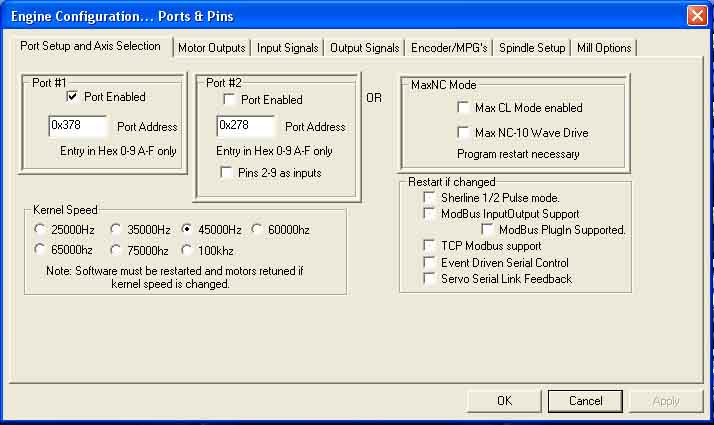
Startup Mach3 and go to : ConfigPorts and Pins
In the first tab ‘Ports Setup an Axis Selection’ you can select the port number and kernel speed.
This should be your DB25 port number and for kernel speed check the manual.
The Kernel Speed depends on the computer, the higher the pulse rate the faster the motors can turn.
The second tab is for the Motor Outputs…
First Enable the axis you want to use, in my case its X,Y,Z and A.
Next are the PIN numbers on the BOB (Breakout Board).
These pin numbers are the pin numbers of the parallel port and the BOB for DIRection and STEP = PLS .
In my last post with the drawings you can see the way these numbers are linked.
The PORT numbers should all stay on 1 if you work with 1 DB25 port.
Then the DIR and STEP should all be low active.
Remember that the Step and Dir signals where tied to the -DIR and -PLS of the drivers.

And now for the Input signals…
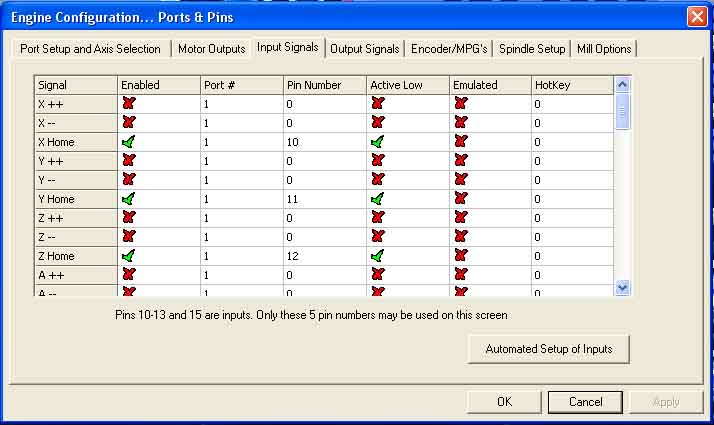
In the previous post I mentioned that you can use limit switches and home switches.
Well I only use 3 home switches, and use the software to apply ‘soft-limits’.
For Home X,Y and Z I used the pins 10, 11 and 12 on the BOB.
The pull-up resisters in my schematic Pull the signal UP to 5V unless the switch is pressed.
The when the switch is active (home position) the signal is LOW, therefore Active Low.
I did not use a home switch for A, although I’m planning to make an index on there later on.
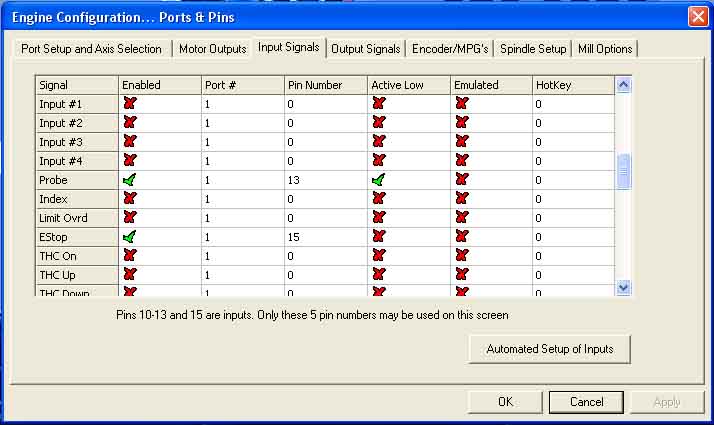
Now scroll down to the Probe, this is PIN number 13 on the BOB.
The probe is used for the Z-touch plate and for the digitizing probe.
The Estop is the only one that is not active low… Hmm why should that be?
The E-stop is a real piece of safety, not only for the machine but for myself.
Therefore the E-stop is a NC (normally closed ) contact, this is safer.
If the cable should break, or the connector or whatever the contact goes open and triggers.
So the estop makes the input low when inactive so is Active High.
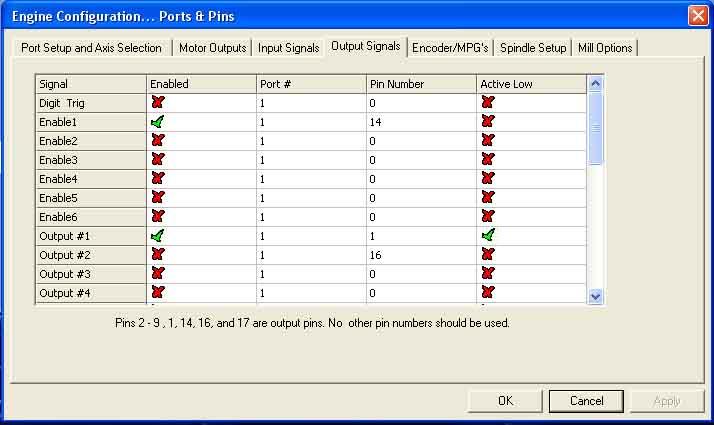
The next tab is the output signals, and in my case I only use 2.
I use 1 enable signal that enables all the stepper drivers when the software is ready.
And I use Output#1 to start or stop the spindle itself.
The ENAble signals where connected to PIN14,
and the Output to the SSR of the spindle was PIN1.
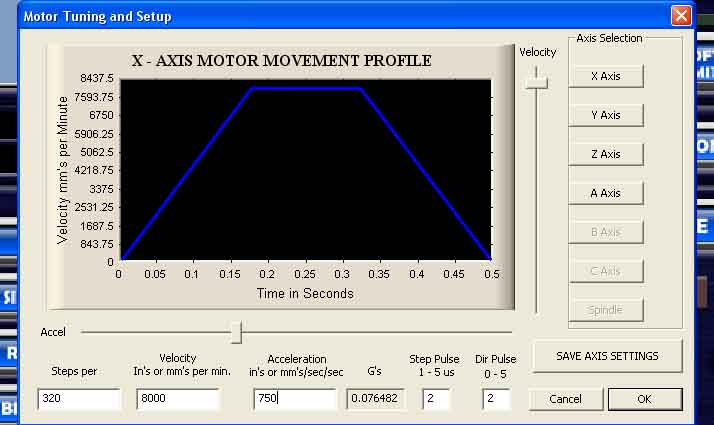
Now the Motor Tuning : Config Motor Tuning and setup.
On the right you can select the axis you want to tune, X in this picture.
Now we have to setup the steps per unit, where the unit is the mm or the inch.
If you use full-step the steps per revolution on the stepper motor is 200.
On the stepper driver I selected to use 8 microsteps so 8×200 = 1600 steps per revolution.
The reason for this is to let the motor run smooth and to have a very small resolution.
The pith of my X leadscrew is 5mm so 5mm/rev. how many steps would that be per unit?
1600 = 1rev = 5mm so 1600/5 = 320 steps per mm (1 step = 0,003125mm resolution)
Now the velocity (the maximum speed of the motor) can be set by number or the right slider.
Firstly set the Acceleration very low and search what the maximum speed is of your axis.
In my case I can easily do the max slider position of 8500mm/min.
Now you can do the same with the acceleration.
Keep them both on the safe side, if you motor stall’s at 2500mm/min don’t put it on 2490 :).
If you also use a rotational axis like me u have an A-axis to.
To set the steps per again check your micro steps (8) : 8×200 = 1600 steps per motor revolution.
In my rotary axis I use a gear ratio of 1:6 so the motor must do 6 revs per chuck rev.
So 1 revolution of the part would be 1600×6= 9600 steps.
As this is a rotational axis 1 unit is not 1mm but 1degree therefore this needs to
be divided by 360degree’s (1rev) : 9600/360= 26.666666 steps per degree.
The pulse length depends on the speed of your electronics, I just leaf it on 2us per pulse
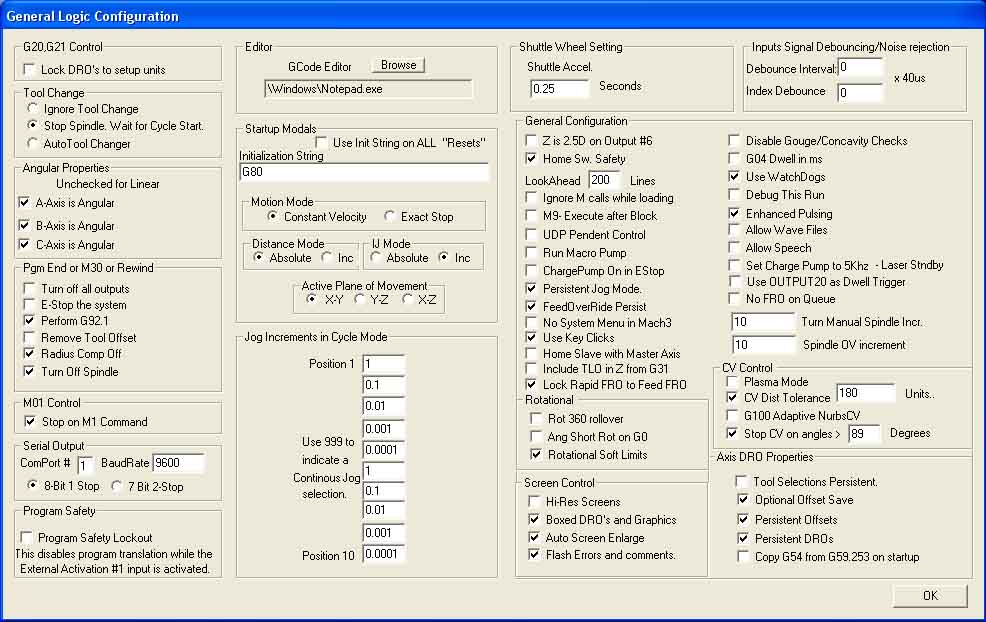
Now the general config, well just have a look at this picture for my settings.
If you have any questions feel free to ask, or check the manual.
Important is to set the A axis angular.
The CV control is important to understand.
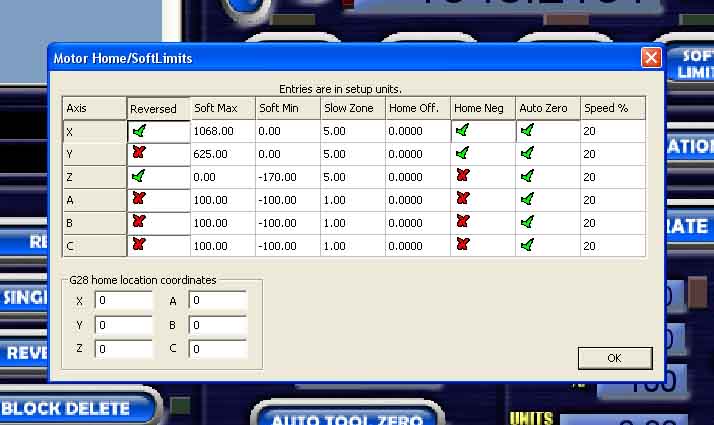
Now the config Homing and soft limits.
As i’m not using limit switches but soft limit I have to set this part up.
In the first column you can reverse the motor if it is going the wrong way.
The rotation of the motor depends on what side of the leadscrew you place it.
The soft max is the highest you want the axis to go from the home position (Soft Min).
The slow zone can be used to slow the machine down when it comes close to one of the limits.
The Z axis is done the other way around, top position is zero, end going down is negative.
This way you can zero on a part and machine negative into the part.
So X and Y would home to the negative position and the Z axis to the positive.
The auto zero is to set the machine coordinate system to zero when homing.
And the 20% speed is the % of max speed to use when homing the axis.
Now save all your settings by Config Save Settings and your good to go.
Of course you can do way more settings, and you will do but for now you can start playing.
If you have any questions feel free to read the manual 🙂
Or just use the comment box beneath.
[youtube]https://www.youtube.com/watch?v=5QalqMwswGk[/youtube]